'AI'에 해당되는 글 4건

  1. 2026.02.16 [Maze] 미로 게임 만들기
  2. 2023.06.09 [AI] Stable Diffusion 설치 하기
  3. 2020.08.03 [Python][AI] XOR 예제
  4. 2020.07.28 [Python][AI] Perceptron 예제
Coding/JavsScript 삽질기2026. 2. 16. 14:48

Gemini 형과 함께 Maze 게임을 만들었다.


1. 게임 해보기
http://www.chobocho.com/game/maze/index.html


Chobocho's 미로 생성기 V0.2

새 미로 ✏️ 🧽 🗑️ 💾

www.chobocho.com


2. 미로 생 로직 소개 (Written by Gemini)

🧠 미로를 만드는 핵심 원리: DFS와 백트래킹

이 코드에서 사용할 핵심 기법은 깊이 우선 탐색(DFS, Depth-First Search) 기반의 백트래킹(Backtracking)입니다. 이름은 거창하지만 원리는 아주 단순합니다.
  1. 일단 갈 수 있는 방향 중 하나를 무작위로 골라 벽을 부수고 전진합니다.
  2. 지나온 길은 '수첩(Stack)'에 기록해 둡니다.
  3. 사방이 다 막혀있거나 이미 방문한 곳뿐이라면(막다른 길), 수첩을 보고 직전에 있었던 갈림길로 되돌아갑니다. (이것이 백트래킹!)
  4. 수첩에 적힌 모든 기록을 지우고 출발지로 돌아오면 미로 완성!
이제 이 원리가 코드로 어떻게 구현되는지 단계별로 살펴보겠습니다.
 

💻 코드 파헤치기
1. 꽉 막힌 방들로 이루어진 판 만들기 (초기화)
먼저 미로의 뼈대가 될 격자(grid)를 만듭니다. 처음에는 모든 칸의 사방(상, 하, 좌, 우)에 벽이 쳐져 있는 상태로 시작합니다.

2. 탐험 준비 및 시작
가장 왼쪽 위 [0][0]을 출발점으로 잡고 탐험을 시작합니다. 

3. ✨핵심 포인트: 가장 먼 종료 지점 찾기
보통 미로를 만들면 습관적으로 가장 반대편인 우측 하단([size-1][size-1])을 도착점으로 둡니다. 
하지만 미로의 길이 꼬불꼬불하다면, 물리적인 거리와 상관없이 실제로 가장 많이 걸어야 하는'가장 난이도가 높은 칸'은 다른 곳일 수 있습니다.
우리는 stack의 길이를 이용해 이 문제를 해결합니다. 
탐험 중 stack에 쌓인 데이터의 개수는 곧 '출발지로부터 현재 위치까지 꺾어 들어온 거리'를 의미하기 때문입니다.

4. 무작위로 벽 부수며 전진하기
이제 인접한 칸 중 아직 안 가본 곳(neighbors)을 찾습니다.
갈 곳이 있다면 무작위로 하나를 골라 현재 칸과 다음 칸 사이의 벽(wall, opp)을 모두 false로 만들어 길을 뚫습니다. 
갈 곳이 없다면 막다른 길이므로 수첩에서 현재 위치를 지우고(stack.pop()) 뒤로 물러납니다.

let neighbors = [];
    for (let d of directions) {
        let nx = current.x + d.dx;
        let ny = current.y + d.dy;
        if (nx >= 0 && nx < size && ny >= 0 && ny < size && !grid[ny][nx].visited) {
            neighbors.push({cell: grid[ny][nx], dir: d});
        }
    }

    if (neighbors.length > 0) {
        // 갈 곳이 있다면 무작위로 벽 부수고 전진
        let chosen = neighbors[Math.floor(Math.random() * neighbors.length)];
        current[chosen.dir.wall] = false;
        chosen.cell[chosen.dir.opp] = false;
        chosen.cell.visited = true;
        stack.push(chosen.cell);
    } else {
        // 막다른 길이면 뒤로 되돌아가기
        stack.pop();
    }
}

5. 마무리 및 데이터 반환
수첩(stack)이 텅 비어 while 문이 끝났다는 것은 모든 방을 다 방문하고 다시 출발지로 돌아왔다는 뜻입니다. 
이제 아까 기록해 둔 '가장 먼 곳'을 종료 지점(isEnd = true)으로 설정하고 데이터를 반환합니다.


3. 소스코드 위치
https://github.com/chobocho/maze_maker


GitHub - chobocho/maze_maker: maze generator

maze generator. Contribute to chobocho/maze_maker development by creating an account on GitHub.

github.com


Posted by chobocho
Coding/Python 삽질기2023. 6. 9. 23:28

1. Python 3.10.6 설치 

https://www.python.org/downloads/release/python-3106/


Python Release Python 3.10.6

The official home of the Python Programming Language

www.python.org

2.  Git 설치

https://git-scm.com/downloads


Git - Downloads

Downloads macOS Windows Linux/Unix Older releases are available and the Git source repository is on GitHub. GUI Clients Git comes with built-in GUI tools (git-gui, gitk), but there are several third-party tools for users looking for a platform-specific exp

git-scm.com

3. Stable diffusion webui 설치

https://github.com/AUTOMATIC1111/stable-diffusion-webui.git


GitHub - AUTOMATIC1111/stable-diffusion-webui: Stable Diffusion web UI

Stable Diffusion web UI. Contribute to AUTOMATIC1111/stable-diffusion-webui development by creating an account on GitHub.

github.com

git clone https://github.com/AUTOMATIC1111/stable-diffusion-webui

4. 모델 다운로드

https://civitai.com/


Civitai | Stable Diffusion models, embeddings, LoRAs and more

Civitai is a platform for Stable Diffusion AI Art models. Browse a collection of thousands of models from a growing number of creators. Join an engaged community in reviewing models and sharing images with prompts to get you started.

civitai.com

https://huggingface.co/WarriorMama777/OrangeMixs


WarriorMama777/OrangeMixs · Hugging Face

AOM3 Counterfeit2.5 Add SUM @ 1.0 0,0.6,0.6,0.6,0.6,0.6,0,0,0,0,0.6,0.1,0.6,0.6,0.6,0.6,0.6,0.5,0.1,0.1,0.6,0.6,0.2,0.6,0.6,0.6 AOM3A3

huggingface.co


모델을 다운 받아서, \stable-diffusion-webui\models\Stable-diffusion 에 넣어 준다.

확장자가 .safetensors 인 것을 받는 걸 추천 한다.

5. 실행

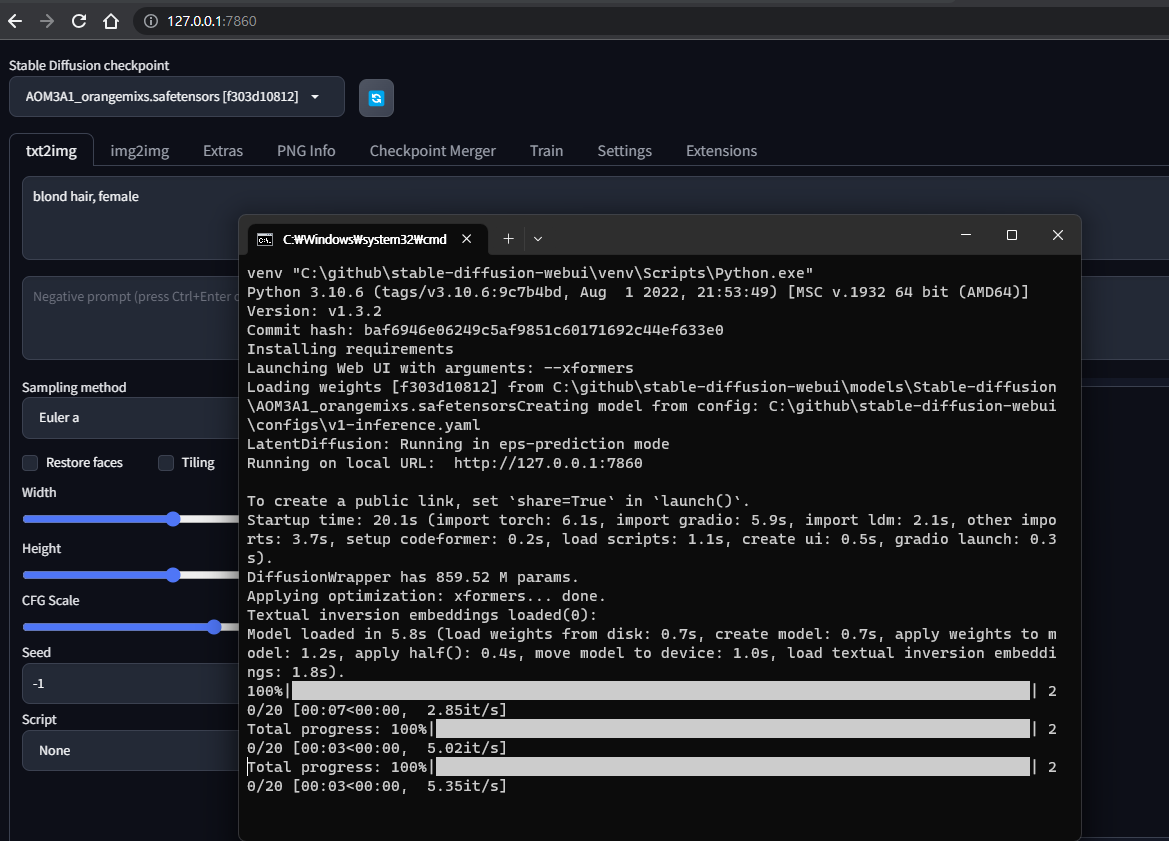
webui-user.bat 를 수행한다. (첫 실행시 이것 저것 설치한다고 시간이 걸린다.)

6. http://127.0.0.1:7860/ 로 웹 브라우저로 접속 하면 된다.
'Coding > Python 삽질기' 카테고리의 다른 글

HTTP Protocol  (0) 2023.08.18
[Python] PyTorch 설치  (0) 2023.04.05
[ChatGPT에게 묻다] python으로 Simple Stack VM 만들기 (3)  (0) 2023.03.17
Posted by chobocho
Coding/Python 삽질기2020. 8. 3. 22:33

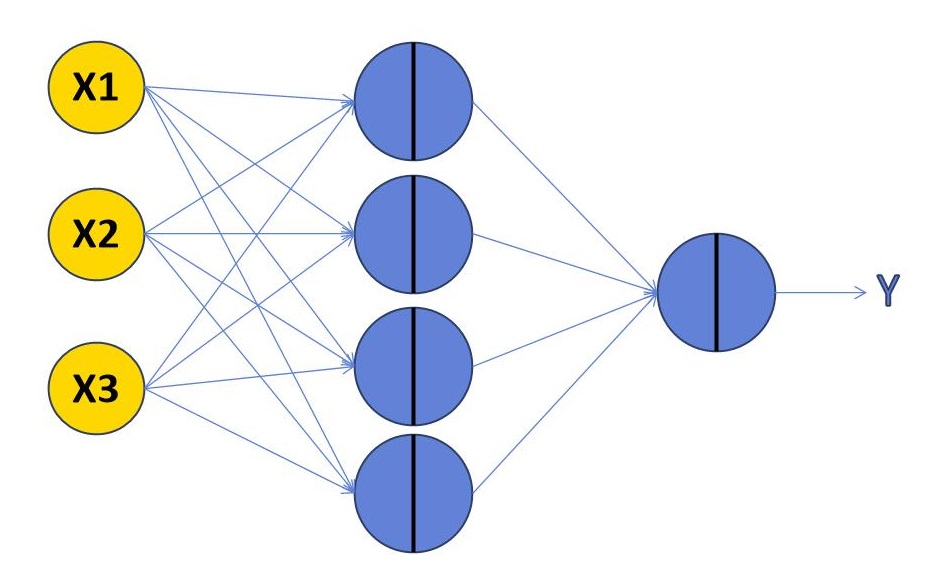
아래와 같이 1개의 은닉층을 가진 신경망을 구성해 보았습니다.


import numpy as np

def sigmoid(x):
    return 1/(1+np.exp(-x))


def DeltaSGD(W1, W2, X, D):
    alpha = 0.9
    
    idx = 0
    for k in X:
        a1 = np.dot(W1, k)
        z1 = sigmoid(a1)
        
        a2 = np.dot(W2, z1)
        y = sigmoid(a2)
        
        e = D[idx] - y
        delta = y * (1-y) * e
        
        e1 = W2 * delta
        delta1 = z1 * (1-z1) * e1

        dw1 = alpha * delta1
        dw1 = dw1.reshape(4,1)
        x = k.reshape(1,3)
        W1 += np.dot(dw1, x)
        
        dw2 = alpha * delta * z1
        W2 += dw2
        idx+=1

        
def Train(epoch, x, y, W1, W2):
    for ep in range (epoch):
        DeltaSGD(W1, W2, x, y)

        
def main():
    W1 = np.random.randn(4,3)
    W2 = np.random.randn(4)
    x = np.array([[0, 0, 1], [0, 1, 1], [1, 0, 1], [1, 1, 1]])
    y = np.array([0, 1, 1, 0])
    trainCount = 10000

    print('---Before Training---')
    print(W1)
    print(W2)
    print('---After Training---')
    Train(trainCount, x, y, W1, W2)
    print(W1)
    print(W2)
    
    print('---Result---')
    for k in x:
        a1 = np.dot(W1, k)
        z1 = sigmoid(a1)
        
        a2 = np.dot(W2, z1)
        y = sigmoid(a2)
        print(y) 
        
        
if __name__ == '__main__':       
    main()        
---Before Training---
[[-0.82542712 -0.65157477  0.09131077]
 [-0.12367401  1.07601221 -1.43941252]
 [-1.00401084 -0.04547823  0.97194216]
 [ 0.02719329 -0.22932678 -0.45809196]]
[ 0.16840571 -0.55206913  1.75255171 -0.54203599]
---After Training---
[[-6.3608461  -6.35976778  2.71126418]
 [ 3.61918383  3.62562196 -5.65337702]
 [-3.70117648 -3.70158904  5.76910815]
 [-1.51981715 -1.56682777 -0.58710802]]
[-11.12882426  -6.71646542   6.50908732  -1.52377049]
---Result---
0.01083108954199271
0.9896067125952175
0.9895881791368779
0.01040259419256147


'Coding > Python 삽질기' 카테고리의 다른 글

[Pygame] Paper Plane Game 만들기  (0) 2020.08.25
[Python][AI] Perceptron 예제  (0) 2020.07.28
[Python] fisher-yates shuffle  (0) 2020.07.20
Posted by chobocho
Coding/Python 삽질기2020. 7. 28. 23:56


import numpy as np

def sigmoid(x):
    return 1/(1+np.exp(-x))


def DeltaSGD(W, X, D):
    alpha = 0.9
    dwSum = np.array([0] * 3)
    
    idx = 0
    for k in X:
        a1 = np.dot(k, W)
        y = sigmoid(a1)
        
        e = D[idx] - y
        delta = y * (1-y) * e
        
        dw = alpha * delta * k
        W += dw
        idx+=1

        
def Train(epoch, x, y, W1):
    for ep in range (epoch):
        DeltaSGD(W1, x, y)

        
def main():
    W1 = np.random.randn(3)
    x = np.array([[0, 0, 1], [0, 1, 1], [1, 1, 1], [1, 0, 0]])
    y = np.array([1, 1, 1, 0])

    Train(10000, x, y, W1)
    
    for k in x:
        a1 = np.dot(k, W1)
        z1 = sigmoid(a1)
        print(z1)    
        
        
if __name__ == '__main__':       
    main()  


0.9962960119369554
0.9999259998523653
0.9929612087250037
0.010332095384834877

'Coding > Python 삽질기' 카테고리의 다른 글

[Python][AI] XOR 예제  (0) 2020.08.03
[Python] fisher-yates shuffle  (0) 2020.07.20
강아지 나이 계산기  (0) 2020.07.16
Posted by chobocho