Tip/Android2025. 10. 30. 00:24

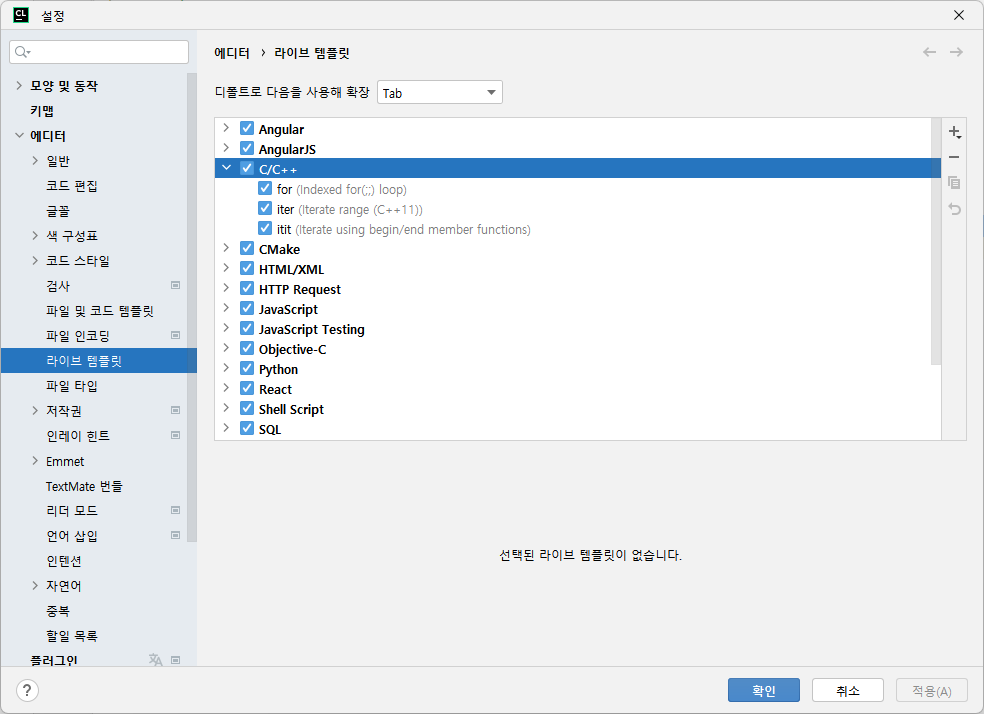
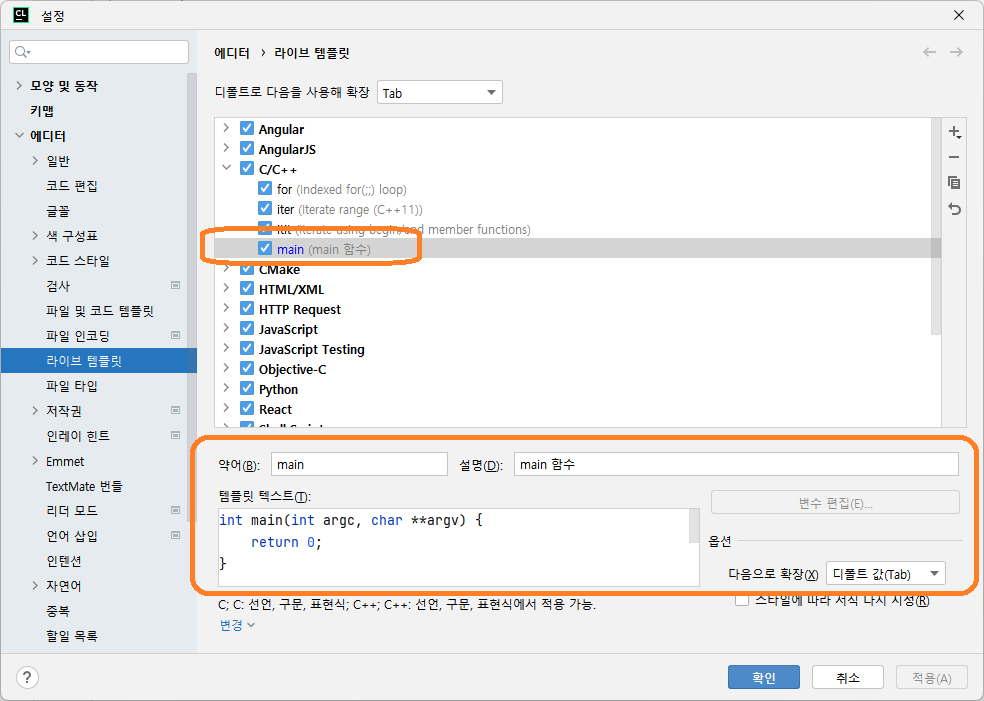
Putty로 접속시 괘선이 깨지는 경우, 위와 같이 설정하면 된다.

Posted by chobocho
Coding/Python 삽질기2025. 10. 29. 00:20
import turtle as t

def draw_shape(length, shape, depth):
    if depth == 0:
        return
    for x in range(shape):
        draw_shape(length/2, shape, depth-1)
        t.forward(length)
        t.left(360/shape)

def main():
    t.speed(0)
    t.penup()
    t.goto(-200,-100)
    t.pendown()
    draw_shape(512, 3, 7)
    t.exitonclick()

if __name__ == '__main__':
    main()

Triangle_512_7.mp4
0.74MB

'Coding > Python 삽질기' 카테고리의 다른 글

AI로 근무 시간 짜주는 스크립트 만들어 보기  (0) 2025.02.27
[Python] Jupyter notebook 팁  (0) 2024.05.11
[SQL] BEGIN TRANSACTION  (0) 2024.03.07
Posted by chobocho
Tip/Windows2025. 9. 30. 01:40
package main

import (
	"fmt"
	"io"
	"os"

	"golang.org/x/text/encoding/korean"
	"golang.org/x/text/transform"
)

func main() {
	if len(os.Args) < 2 {
		// 표준 입력(stdin)에서 euc-kr로 인코딩된 데이터를 읽습니다.
		eucKrReader := transform.NewReader(os.Stdin, korean.EUCKR.NewDecoder())

		// euc-krReader에서 읽은 데이터를 utf-8로 변환하여 표준 출력(stdout)에 씁니다.
		_, err := io.Copy(os.Stdout, eucKrReader)
		if err != nil {
			fmt.Fprintf(os.Stderr, "Error: %v\n", err)
			os.Exit(1)
		}
	} else if len(os.Args) == 2 && os.Args[1] == "-kr" {
		// 표준 출력(stdout)을 EUC-KR 인코더로 래핑합니다.
		eucKrWriter := transform.NewWriter(os.Stdout, korean.EUCKR.NewEncoder())

		// 표준 입력(stdin)에서 읽은 UTF-8 데이터를 EUC-KR로 변환하여 씁니다.
		_, err := io.Copy(eucKrWriter, os.Stdin)
		if err != nil {
			fmt.Fprintf(os.Stderr, "Error: %v\n", err)
			os.Exit(1)
		}
	} else {
		print("Chobocho's EUC-KR to UTF-8 Converter V0.2\n" +
			"Usage: utf.exe < euc_kr_file.txt\n" +
			"       utf.exe -kr > euc_kr_file.txt\n")
	}
}
Posted by chobocho
Tip/Windows2025. 9. 13. 11:42

진짜 포장만 뜯고 안 쓴 노트북인지 확인하는 방법

부팅해서 cmd창 열고 위 명령어 넣으면 됨

생성된 파일 battery-report.html을 열어보면 아래와 같이 배터리 충방전 이력이 표시됨

Posted by chobocho
Tip/Linux2025. 9. 12. 21:16

사칙연산과 변수명을 지원하는 간단한 계산기 예제

calc.l

%{
#include <string.h>
%}

EXIT      [quit()|exit()]
MSG       \"[a-zA-Z0-9_\-\$:; ]{0,128}\"
NAME      [a-zA-Z][_\-\$a-zA-Z0-9]{0,19}
NUMBER    [0-9]+

%%
{EXIT}    { exit(0); }
{MSG}     {
            int len = yyleng - 2;
            strncpy(yylval.sMsg, yytext + 1, len);
            yylval.sMsg[len] = '\0';
            return MSG;
          }
{NAME}    { strcpy(yylval.sVal, yytext); return NAME; }
{NUMBER}  { yylval.iVal = atoi(yytext); return NUMBER; }
[ \t]     ;
"?"       { return PRINT; }
"\n"      { return '\n'; }
"\r"      { return '\n'; }
.         { return yytext[0]; }

calc.y

%{
#include <stdio.h>
#include <string.h>
#include <stdbool.h>

extern int yylex();
void yyerror(const char *s);
int getVarIndex(const char *name);

#define MAX_VARS     100
#define MAX_NAME_LEN 20

typedef struct {
    char name[MAX_NAME_LEN + 1];
    int value;
} Variable;

Variable vars[MAX_VARS];
int varCount = 0;

char **fileList;
unsigned int currentFile = 0;
unsigned int nFiles = 0;
%}

%union {
    int iVal;
    char sVal[40];
    char sMsg[128];
}

%token <iVal> NUMBER
%token <sVal> NAME
%token <sMsg> MSG
%token PRINT
%type <iVal> expr

%left  '-' '+'
%left  '*' '/'
%nonassoc UMINUS
%%

stat_list:
        | stat_list stat '\n'
        ;
stat:
        | PRINT MSG NAME {
            int idx = getVarIndex($3);
            int value = (idx != -1) ? vars[idx].value : 0;
            printf("%s %d\n", $2, value);
          }
        | PRINT MSG  { printf("%s\n", $2); }
        | NAME '=' expr {
            int idx = getVarIndex($1);
            if (idx != -1) {
                vars[idx].value = $3;
            }
          }
        | expr { printf("= %d\n", $1); }
        ;

expr: NUMBER { $$ = $1; }
      | NAME {
          int idx = getVarIndex($1);
          $$ = (idx != -1) ? vars[idx].value : 0;
        }
      | expr '+' expr { $$ = $1 + $3; }
      | expr '-' expr {  $$ = $1 - $3; }
      | expr '*' expr { $$ = $1 * $3; }
      | expr '/' expr {
            if ($3 == 0) {
                yyerror("Divide by zero");
                $$ = 0;
            } else {
                $$ = $1 / $3;
            }
        }
    | '-' expr %prec UMINUS { $$ = -$2; }
    | '(' expr ')' { $$ = $2; }
    ;
%%

#include "lex.yy.c"

void yyerror(const char *s){
    fprintf(stderr, "Error: %s\n", s);
}

int getVarIndex(const char *name) {
    for (int i = 0; i < varCount; i++) {
        if (strcmp(name, vars[i].name) == 0) {
            return i;
        }
    }
    if (varCount < MAX_VARS) {
        strcpy(vars[varCount].name, name);
        vars[varCount].value = 0;
        return varCount++;
    }
    yyerror("Variable table full");
    return -1;
}

int main(int argc, char **argv) {
    printf("Chobocho'c Calc V0.1\n");

    FILE *file = NULL;
    fileList = argv + 1;
    nFiles = argc - 1;

    if (argc == 2) {
    	currentFile = 1;
    	file = fopen(argv[1], "r");
    	if (!file) {
    		fprintf(stderr, "Could not open %s\n", argv[1]);
    		exit(1);
    	}
    	yyin = file;
    }

    return yyparse();
}

makefile

CC = gcc
LIBS = -lfl
LEX = flex
YACC = yacc

all: calc2

calc2: y.tab.c lex.yy.c
	$(CC) -o calc2 y.tab.c $(LIBS)

y.tab.c: calc.y
	$(YACC) -dv calc.y

lex.yy.c: calc.l
	$(LEX) calc.l

clean:
	rm y.tab.h
	rm y.tab.c
	rm y.tab.h.pch
	rm lex.yy.c
	rm calc2

Test Sample

10 + 20
rabbit = 20
dog = 30
cat = 10
chicken = 10
total_legs = dog * 4 + rabbit * 4 + chicken * 2 + cat * 4
? "Total legs:" total_legs
totalAnimals = rabbit + dog + cat + chicken
? "Total Animals:" totalAnimals

Test 결과

'Tip > Linux' 카테고리의 다른 글

[Termux] VS Code 설치 및 실행  (0) 2025.12.11
LEX 기초  (0) 2025.09.09
Lex & Yacc로 간단한 사칙연산 계산기 만들기  (0) 2025.09.02
Posted by chobocho
Tip/Android2025. 9. 11. 01:38

1. Termux에서 sshd  실행 및 IP 확인

예제에서는 192.168.0.20이 Termux가 설치된 휴대폰의 IP 이다.

2. CLion 실행

3. SFTP 구성

도구 -> 배포 -> 구성

SSH 설정
 

4. CLion에서 휴대폰으로 접속하기

도구 -> 배포 -> 원격 호스트 찾아보기 실행

그럼 우측에 아래와 같이 화면이 뜨면, 위에서 설정한 SFTP 의 이름을 선택한다.

그리고 작업하려는 폴더를 선택한다.

5. CLion 에서 SSH 세션 실행

Posted by chobocho
Tip/Linux2025. 9. 9. 00:46

WordCount 예제

%{
    unsigned int charCount = 0, wordCount = 0, lineCount = 0;
%}

word [^ \t\n]+
eol  \n

%%
{word} { wordCount++; charCount += yyleng; }
{eol}  { charCount++; lineCount++; }
.      { charCount++; }
%%

int main(int argc, char **argv) {
        yylex();
        printf(" %d %d %d\n", lineCount, wordCount, charCount);
        return 0;
}

WordCount 예제 2 (파일에서 읽기)

%{
    unsigned int charCount = 0, wordCount = 0, lineCount = 0;
%}

word [^ \t\n]+
eol  \n

%%
{word} { wordCount++; charCount += yyleng; }
{eol}  { charCount++; lineCount++; }
.      { charCount++; }
%%

int main(int argc, char **argv) {
        FILE *file = NULL;
        if (argc > 1) {
                file = fopen(argv[1], "r");
                if (!file) {
                        fprintf(stderr, "Could not open %s\n", argv[1]);
                        exit(1);
                }
                yyin = file;
        }
        yylex();
        printf(" %d %d %d %s\n", lineCount, wordCount, charCount,
                        (file == NULL ? "" : argv[1]));
        return 0;
}

Posted by chobocho
Tip/Linux2025. 9. 2. 01:30

1. Lex파일 만들기 (calc.l)

%{
%}

%%
"quit"    { exit(0); }
[0-9]+    { yylval = atoi(yytext); return NUMBER; }
"+"       { return PLUS; }
"-"       { return MINUS; }
"*"       { return TIMES; }
"/"       { return DIVIDE; }
"("       { return '('; }
")"       { return ')'; }
[ \t]     ;
"\n"      { return '\n'; }
.         ;

2. Yacc 파일 만들기 (calc.y)

%{
#include <stdio.h>
extern int yylex();
void yyerror(const char *s);
%}

%token NUMBER
%token PLUS MINUS TIMES DIVIDE
%left  PLUS MINUS
%left  TIMES DIVIDE

%%
stat_list:
		 | stat_list stat
		 ;
stat: expr '\n' { printf("= %d\n", $1); }
	;

expr: NUMBER           { $$ = $1; }
	| expr PLUS   expr { $$ = $1 + $3; }
	| expr MINUS  expr { $$ = $1 - $3; }
	| expr TIMES  expr { $$ = $1 * $3; }
	| expr DIVIDE expr { 
	    if ($3 == 0) yyerror("Divide by zero");
	    else $$ = $1 / $3;
	}
	| MINUS expr %prec MINUS {$$ = -$2; }
	| '(' expr ')'     { $$ = $2; }
	;

%%

#include "lex.yy.c"

void yyerror(const char *s){
    fprintf(stderr, "Error: %s\n", s);
}

int main() {
    printf("Chobocho'c Calc V0.1\n");
    return yyparse();
}

3. Make파일 만들기

CC = gcc
LIBS = -lfl
LEX = flex
YACC = yacc

all: calc2

calc2: y.tab.c lex.yy.c
	$(CC) -o calc2 y.tab.c $(LIBS)

y.tab.c: calc.y
	$(YACC) -dv calc.y

lex.yy.c: calc.l
	$(LEX) calc.l

clean:
	rm y.tab.h
	rm y.tab.c
	rm y.tab.h.pch
	rm lex.yy.c
	rm calc2

4. 빌드 & 실행

'Tip > Linux' 카테고리의 다른 글

Lex & Yacc로 간단한 사칙연산 계산기 만들기2  (0) 2025.09.12
LEX 기초  (0) 2025.09.09
컴파일러 관련 기초 서적 정리 (한글판만)  (0) 2025.01.18
Posted by chobocho
Tip/Android2025. 5. 8. 01:03

ULTRA 워드 앱은 어떠한 개인 정보도 수집하지 않습니다. 
ULTRA Word does not collect any personal information.

다운로드 링크:

https://play.google.com/store/apps/details?id=com.chobocho.wordmaster&pcampaignid=web_share


UltraWord - Google Play 앱

초 간단 단어장 입니다

play.google.com


Posted by chobocho
Coding/JavsScript 삽질기2025. 3. 18. 01:07

오래전에 친구의 PDA로 열심히 하였던 Crazy Daisy Game의 클론을 만들어 보았다.

플레이하기: http://chobocho.com/game/daisy/index.html


CrazyDaisy Game

Version V0.2

chobocho.com


어떻게 만들었는가?

1. 게임은 아래와 같이 서로 인접한 잎이 같은 색인 경우 없어 지는 것이 기본 룰이다.

그래서 먼저 아래와 같이 서로 인접한 잎을 숫자로 표시하였다.


2. 그리고 실제 매번 체크해야 하는 인접 꽃잎의 정보는 아래와 같이 테이블을 만들었다.

[ 꽃번호 * 10 + 꽃잎번호, 인접 꽃번호 * 10 + 꽃잎번호]의 쌍으로 만들었고,

가운데 있는 꽃을 0번으로, 3시 방향의 꽃을 1로 시계 방향으로 돌아가면서 번호가 증가 한다고 가정 하였다.

그리고 아래 코드를 이용하여 현재 상태에서 마주 하는 꽃잎이 있는 지를 체크 하였다.

자세한 내용은 아래 전체 소스 코드를 참고 하면 됩니다. ^^

전체 소스코드: https://github.com/chobocho/daisygame


GitHub - chobocho/daisygame: Daisy Game

Daisy Game . Contribute to chobocho/daisygame development by creating an account on GitHub.

github.com


Posted by chobocho